
Let your AI apps work. Keep the off switch.
Claude, ChatGPT, Codex and Cursor reach your accounts and your Mac through one MCP address. Your rules decide what they can do.









Your AI work keeps going when Claude runs out.
When one agent hits its limit, Kin hands the job to the next one with usage left, in the same folder and branch. Their questions come to your phone, and the changes you care about wait for your yes.
7 days free. No card needed.
Switch AI apps. Keep your rules.
Switch mid-task. Your work follows you.
Try Pro freeSee every move. Pause them all at once.
How pausing worksTry it. Your rules decide.
 Claude wants to use
  Work Notion
Claude wants to
Edit the plan
Work Notion · "Launch moves to Tuesday"
Ask me
Step away. Approve from anywhere.
iPhone and Apple Watch on TestFlight, Android on Google Play, or any browser.
How approvals work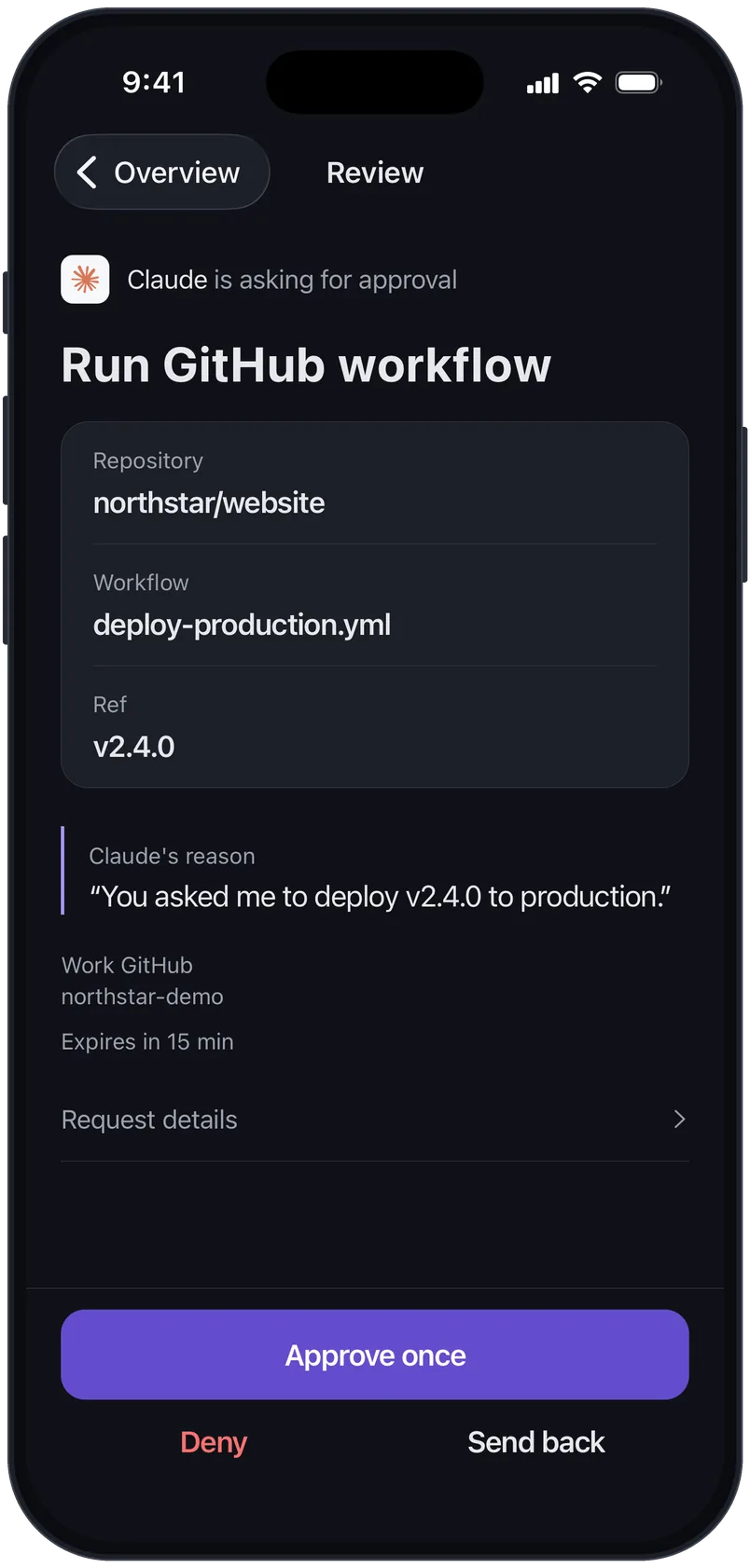
Bring your team. Own the accounts.
Start with control. Grow from there.
Free
Rules and approvals for your AI apps.
$0/ month
No card needed
Includes
- Allow, Ask me or Block for each account and action
- Approve actions before they run
- A profile for each client
- Activity log
- Pause every AI app's access at once
- Shorten very large results
- Protection against duplicate changes
- 2 AI apps
- 5 connections
- 1,000 actions a month
- No computer pairing
Lite
Shared notes and tasks for your AI apps.
$8USD / month$9USD / month
$96 billed yearlyBilled monthly
Everything in Free, plus
- Notes your AI apps share
- Tasks every AI app can see and update
Also included
- Allow, Ask me or Block for each account and action
- Approve actions before they run
- A profile for each client
- Activity log
- Pause every AI app's access at once
- Shorten very large results
- Protection against duplicate changes
- Cancel anytime
- 5 AI apps
- 10 connections
- 5,000 actions a month
- No computer pairing
Pro
RecommendedBring your computer and coding agents into Kin.
$16USD / month$19USD / month
$192 billed yearly7 days free, no cardBilled monthly7 days free, no card
Try Pro freeTry Pro free
Buy Pro
Starts today at $192 a year. No trial.
Buy Pro
Starts today at $19 a month. No trial.
Everything in Lite, plus
- Pair your computer: Mac, Windows or Linux
- When Claude hits its limit on your Mac, Codex picks up
- Connect any API
- Run several AI apps on one job
Also included
- Notes your AI apps share
- Tasks every AI app can see and update
- Allow, Ask me or Block for each account and action
- Approve actions before they run
- A profile for each client
- Activity log
- Pause every AI app's access at once
- Shorten very large results
- Protection against duplicate changes
- Cancel anytime
- 20 AI apps
- 25 connections
- 50,000 actions a month
- Pair your computers
Team
One workspace and one bill for your team.
$20USD / seat / month$25USD / seat / month
$240 a seat billed yearly2 seats minimum14 days free, card neededBilled monthly2 seats minimum14 days free, card needed
Everything in Pro, plus
- A shared workspace you invite people to
- One bill for the whole team
- Limits pooled across the seats
Also included
- Pair your computer: Mac, Windows or Linux
- When Claude hits its limit on your Mac, Codex picks up
- Connect any API
- Run several AI apps on one job
- Notes your AI apps share
- Tasks every AI app can see and update
- Allow, Ask me or Block for each account and action
- Approve actions before they run
- A profile for each client
- Activity log
- Pause every AI app's access at once
- Shorten very large results
- Protection against duplicate changes
- Cancel anytime
- Same as Pro, for every seat
Enterprise
Audit, retention and terms for your company.
Custom pricing
Everything in Team, plus
- Single sign-on with your company's identity provider
- Audit log export to your security tools
- Choose how long activity is kept
- Billing by invoice
- Contract terms for your company
In development: SCIM in December, EU data on request in 2027, customer-managed keys as an add-on in 2027. Shield is in testing with security teams. We reply within one business day.
Also included
- A shared workspace you invite people to
- One bill for the whole team
- Limits pooled across the seats
- Pair your computer: Mac, Windows or Linux
- When Claude hits its limit on your Mac, Codex picks up
- Connect any API
- Run several AI apps on one job
- Notes your AI apps share
- Tasks every AI app can see and update
- Allow, Ask me or Block for each account and action
- Approve actions before they run
- A profile for each client
- Activity log
- Pause every AI app's access at once
- Shorten very large results
- Protection against duplicate changes
- Limits set in your contract
Common questions
What is Kin?
Kin sits between your AI apps and your accounts. Connect each account once, then decide what each AI app may do with it. Each action runs, waits for your approval, or stops at Kin, by your rules.
Which AI apps work with Kin?
Claude, Claude Code, ChatGPT, Codex, Cursor and any other AI app that can add a remote MCP server. They all use the same Kin address and follow the same rules. ChatGPT needs a plan or workspace that lets you add a custom MCP server, and paying for Kin doesn't change that. Add Kin to your AI apps
Can an AI app get around Kin?
Not around your rules. Kin checks them on its own server before each call reaches your account, and AI apps never hold the sign-ins. Kin governs only the actions that go through it. What an app reaches on its own, like an account connected in the app itself or a coding agent's access to your computer, follows that app's controls. To keep an account behind your rules, connect it only through Kin and remove it from the AI app's own connections.
Who holds my keys, and what does Kin keep?
Kin holds them, encrypted, and uses a sign-in only for the calls your rules allow. Remove an AI app and its access ends at once, with any requests it left waiting. What Kin holds lists everything Kin stores and for how long.
Why not connect accounts in my AI app?
An account connected there works in that one app: you sign in again in every app, and each asks permission its own way. With Kin you connect once and set rules once, asks wait in one place, and one record shows what each app did. Switch AI apps any time. Your connections and rules stay, and a new app follows the rules you already set. If you use one AI app and its own controls are enough, you may not need Kin.
Can I keep clients apart?
Yes. Put each client's accounts in a profile of their own. An AI app you add with a profile's address reaches only that profile's accounts. How profiles work
Can my team use it?
Yes. Team gives your company one workspace for its connections and members, with one bill for every seat. Start a team, or talk to us about Enterprise.
What if I cancel?
Cancel anytime in Settings, under Workspace and plan. Cancel during the free trial and you are never charged. Cancelling deletes nothing: your connections, rules and activity history stay, and the Free plan's limits apply.